Imagine pressing one button and instantly getting a perfect copy of a document. It feels ordinary today, but it wasn’t always this simple. Before copy machines, duplicating papers meant messy carbon sheets, handwritten copies, or slow photographic processes.
Knowing the history matters because different generations use different terms like photocopier, copy machine, or multifunction printer. That can make it harder to figure out what someone actually wants when they ask for an “upgrade.” Learning how copiers evolved helps you ask the right questions, choose the right features, and appreciate the technology that powers modern home offices and small businesses.
In this article, we’ll explore when copy machines were invented, the major milestones that shaped modern copiers, and what this history means when you’re choosing equipment today.
Quick Rundown: History of Copier Machines
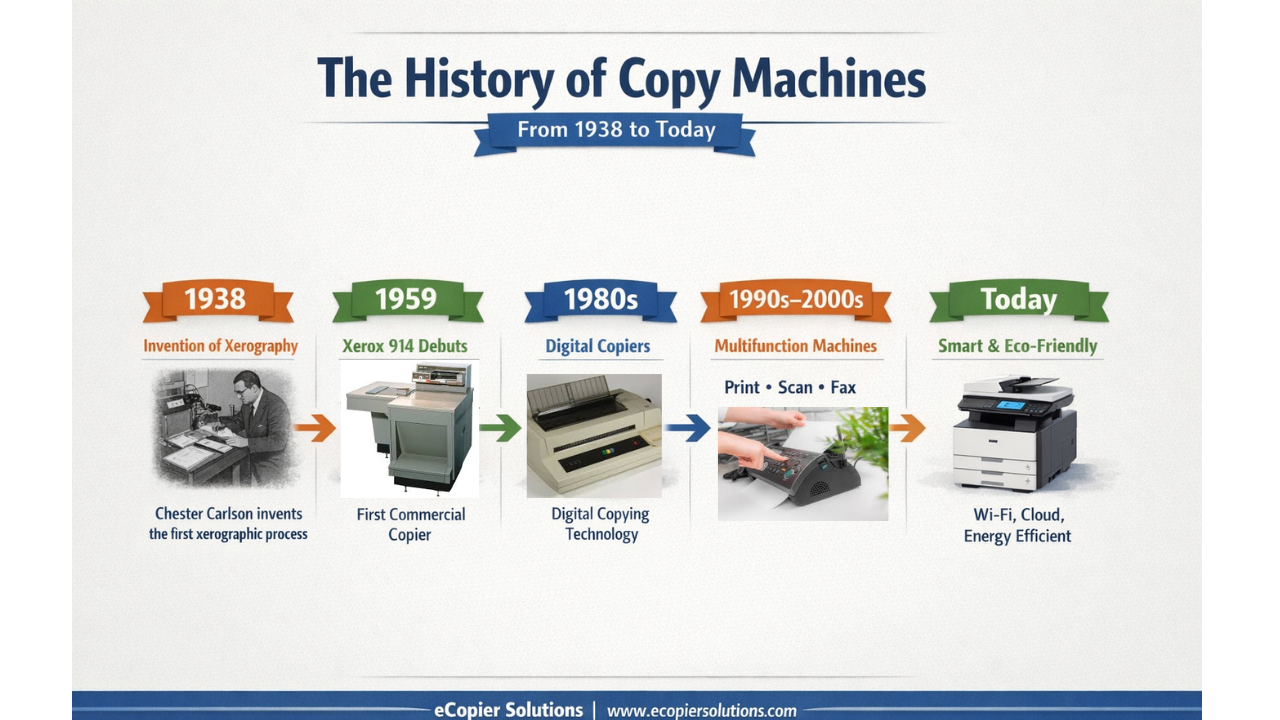
- Copy machines were invented in 1938 when Chester Carlson created the first xerographic image in a small lab in Queens, New York.
- The first commercially successful copier was the Xerox 914 (introduced in 1959 and shipped widely in 1960).
- Understanding copier history helps you decode terms like xerography, copier, MFP, and managed print, which makes upgrades and leasing decisions easier.
- Modern copiers are no longer “just copiers.” They are print, scan, copy, and document workflow hubs that can support remote work and cloud storage.
How Did People Duplicate Documents Before Copy Machines?
Ever wonder about how our grandparents thrived in an office environment without Xerox machines or even fax machines? Before modern copiers, duplication was slow, expensive, and often frustrating. They did not have any duplicating machines at all!
They heavily rely on manual duplication methods such as:
- Handwritten copies, which took time and introduced mistakes
- Carbon paper, which was messy and limited to a few copies
- Mimeograph machines, often used in schools and churches
- Photographic duplication, which required chemicals and special equipment
If you’ve ever dealt with smudged carbon paper or faded duplicate pages, you already understand why the copier became one of the most important office inventions of the 20th century.
1938: The First Copy Machine Was Invented (Xerography Is Born)
So, when were copy machines invented?
The key breakthrough happened in 1938, thanks to Chester Carlson, a patent attorney and physicist who was tired of manually copying documents.
Carlson developed a process called xerography, which comes from Greek words meaning “dry writing.” That name mattered because earlier duplication methods often involved ink, wet chemicals, or carbon layers.
How the First Copy Machine Worked
On October 22, 1938, in a rented room in Astoria, Queens, Carlson and his assistant Otto Kornei produced the first successful xerographic image.
It wasn’t a fancy business document. It was a simple handwritten message:
“10-22-38 ASTORIA.”
That one test proved copying could be done cleanly and reliably using a dry process.
1940s: From Lab Experiment to Real-World Potential
Carlson’s invention didn’t instantly become a household product. In fact, many large companies rejected it early on.
It took almost a decade before the right partner saw the long-term value.
1947: Haloid Takes a Chance on Carlson’s Idea
In 1947, the Haloid Company (a photographic paper company) signed an agreement to develop Carlson’s process.
This partnership eventually turned Haloid into a new name you definitely recognize today:
Xerox.
This is an important part of copier history because it explains why many people still use “Xerox” as a verb. For years, Xerox dominated the copier market so strongly that “making a Xerox” became everyday language.
1959 to 1960: The Xerox 914 Changes Everything
Even though xerography was invented in 1938, the copier didn’t truly take over offices until the Xerox 914.
Why the Xerox 914 Was a Big Deal
The Xerox 914 was introduced in 1959, and it became widely used after shipping to customers in 1960.
This machine was revolutionary because it was the first copier that was:
- Practical for everyday office use
- Reliable enough for regular workloads
- Simple enough that anyone could operate it
The name “914” came from its copy size capability: up to 9 inches by 14 inches.
Xerox 914 Copy Speed and Performance
The Xerox 914 could produce:
- The first copy in about 15 seconds
- Additional copies in about 7 to 8 seconds each
That doesn’t sound impressive compared to modern speeds, but it was a massive leap at the time.
For offices, schools, and government departments, it changed everything. Copying stopped being a specialized task and became something anyone could do in seconds.
1960s to 1970s: Copying Becomes Normal (And Offices Transform)
Once copier technology proved itself, adoption exploded.
Businesses used copiers to:
- Duplicate contracts and legal paperwork
- Create training materials
- Copy invoices, receipts, and forms
- Share internal memos quickly
- Support schools, universities, and libraries
This is when the copier became a permanent fixture in the modern workplace.
It also introduced a new reality: printing and copying costs could spiral fast if businesses didn’t track usage.
That’s still true today, and it’s one reason Managed Print Services became so popular.
1980s to 1990s: Digital Copying Arrives
Early copiers were mostly analog. Over time, the industrial revolution shifted into digital copying, which completely changed how machines worked behind the scenes.
Digital copiers have improved and evolved to:
- Image quality
- Consistency across large jobs
- Copying speed
- Reliability and maintenance tracking
More importantly, digital systems opened the door for machines to store and process documents internally.
That laid the foundation for what we now call the multifunction printer.
1990s to 2000s: The Multifunction Printer (MFP) Era
By the late 1990s and early 2000s, many businesses didn’t want separate machines for:
- Printing
- Copying
- Color copying full-color prints
- Scanning
- Faxing
So manufacturers began building all-in-one units that could handle multiple tasks.
That’s how the copier evolved into the MFP, or multifunction printer.
Why This Matters for Homeowners
If you have a home office, an MFP is often the sweet spot because it:
- Saves space
- Reduces the number of devices you manage
- Makes scanning and copying much easier
- Supports wireless printing and mobile use
For many homeowners, the “copier” is no longer a standalone machine. It’s a modern printer that also copies.
2010s to Today: Copiers Become Smart, Connected, and Eco-Friendly
Modern copier machines are closer to computers than classic office equipment.
Today’s devices often include:
- Touchscreen interfaces
- Cloud printing and scanning through cloud connectivity
- Secure printing (PIN release)
- Mobile printing support through network connectivity
- Automatic duplex printing (double-sided)
- Built-in document workflows
- Energy-saving modes
How Printing Needs Changed in Modern Homes and Small Businesses
Printing didn’t disappear. It just changed.
Today, many people are running a home office, managing paperwork for school and healthcare, or operating a small business that still relies on printed documents. That means modern copiers need to do more than make copies.
Now, many users want to:
- Scan documents directly to email or cloud folders
- Print from laptops and phones through scan to email
- Features remote printing in remote set-ups
- Features secure prints by only sharing files securely without USB drives
- Reduce paper waste with digital workflows and storage
This is where modern copiers shine, especially for small businesses that want enterprise-level features without enterprise-level complexity.
What Copier History Teaches You When Upgrading Today
Most business operations don’t upgrade because they love the ever-evolving technology.
They upgrade because something stops working, like:
- The machine jams constantly
- Toner costs are out of control
- The device is too slow
- Wireless printing is unreliable
- Scanning feels complicated
- Repairs are too frequent
- Switching to better, more sustainable materials
Understanding copier history helps because it shows why modern machines are built the way they are.
For example:
- If you grew up saying “Xerox,” you might still think of copying as a single-purpose task.
- If you’re younger, you might assume every copier automatically scans to email or cloud storage.
Neither is wrong. They’re just different expectations based on what people used during different eras and office practices.
Managed Print Services (MPS): The Modern Upgrade Most People Overlook
A lot of people think upgrading means buying a newer copier.
Sometimes, the smarter move is upgrading your entire printing setup with Managed Print Services (MPS).
MPS helps businesses through upgrading their office efficiency:
- Control monthly printing costs
- Reduce wasted paper and toner
- Get proactive maintenance
- Avoid surprise downtime
- Keep devices secure and up to date
If you run a small business or print regularly from a home office, MPS is often the difference between “printing is a constant headache” and “printing just works.”
When Should You Upgrade Your Copier or Printer?
If you’re reading this article, you might already be thinking about an upgrade.
Here are a few practical signs it’s time:
- Your machine is 7+ years old
- You print or scan weekly and reliability matters
- You need wireless printing, but your device struggles
- Toner or ink costs feel unreasonably high
- You want faster scanning for school, legal, or business documents
- You want eco-friendly features like duplex printing and energy-saving features
If that sounds like you, it may be time to look at modern copier solutions designed for today’s workflows.
Work With a Trusted Copier Partner
Copiers have come a long way since 1938, but choosing the right machine still depends on your space, budget, and daily needs.
At eCopier Solutions, we help homeowners and small businesses choose reliable copier and printer setups that fit real life, not just spec sheets. We also provide Managed Print Services (MPS), ongoing support, maintenance, and eco-friendly printing solutions to keep your printing system efficient and cost-effective.
If you’re ready to upgrade, explore your options at eCopier Solutions and talk with a team that can match you with the right solution.





.webp)

.png)