
Your home or office laser printer has sat untouched for months, and now you need it for an important document. So, does laser printer toner dry out while the machine sits idle? The short answer is no, although other problems can affect the first pages you print.
Today, we’ll tell you what can happen during storage, how long toner lasts, how to preserve it, and what to check if the output looks wrong. Let’s get started!
Does Laser Printer Toner Dry Out?
No, laser printer toner does not dry out because it consists of powder with no liquid carrier to evaporate. That makes it different from inkjet ink, which can dry inside printhead nozzles during extended periods without use.
For context, HP’s guidance on supply lifespan estimates that installed toner may remain usable for two to three years while a printer sits idle. But make sure to treat that as a general reference. Your model, storage conditions, and supply condition still determine whether it will print properly.
The distinction becomes clearer once you separate the powder from the components around it.
Toner Starts as a Dry Powder
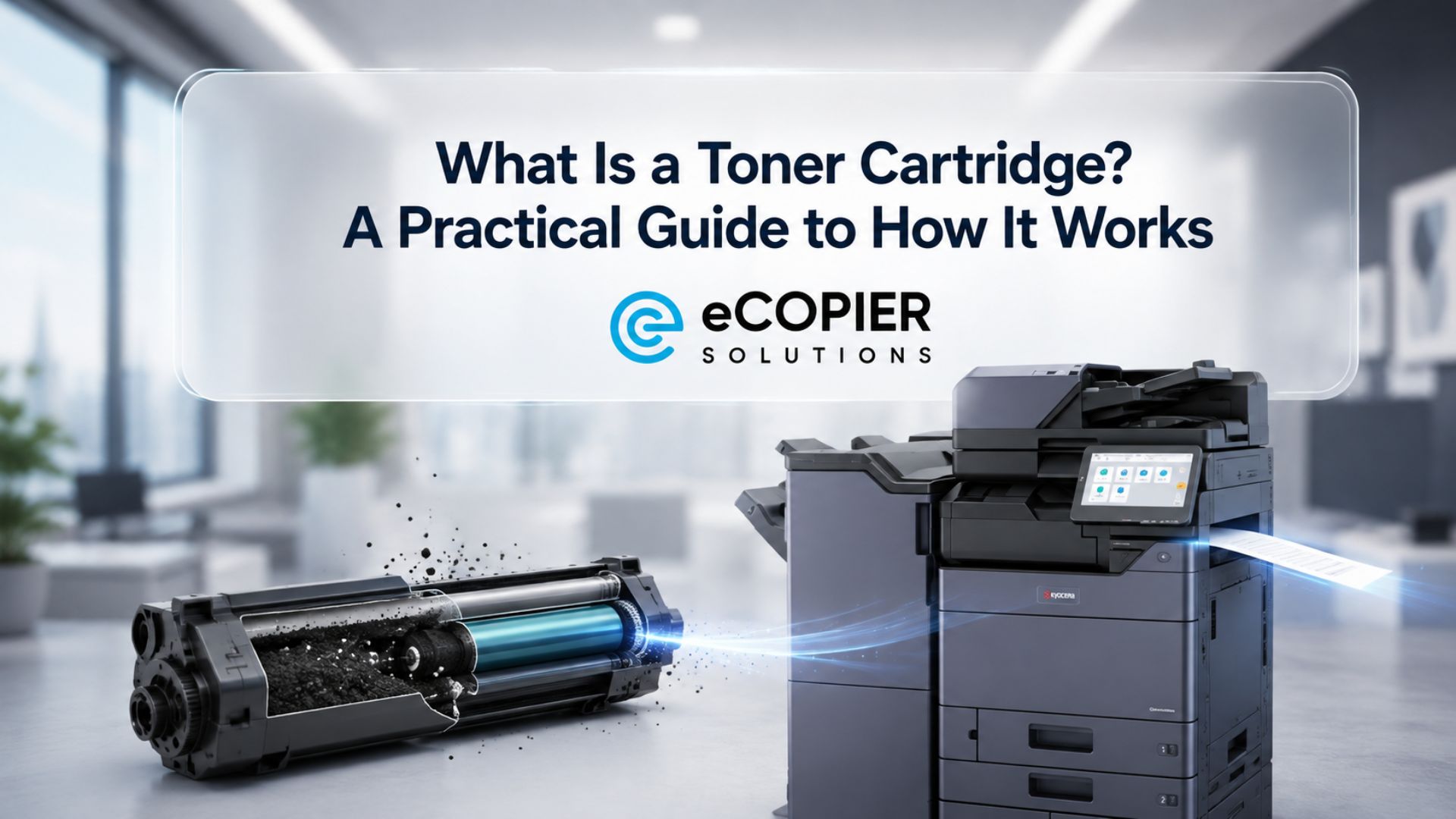
The pigments, polymers, and additives in dry toner form fine particles. During printing, the imaging system attracts those particles to a drum, transfers the image to paper, and uses heat and pressure to bond it in place.
Our guide to how toner cartridges work explains that process in more detail. Since the material already starts as powder, inactivity alone cannot create a dried ink plug inside a nozzle.
Humidity Can Cause Toner to Clump
Moisture can affect powder flow, particularly when packaging or seals offer poor protection. Particles may stick together and feed unevenly through the imaging system.
The result can be patchy coverage or faded areas. People sometimes describe that as dried-out toner, but the underlying problem is moisture exposure. Adding water will only make matters worse.
Heat and Light Can Affect Cartridge Components
Excess heat can affect the powder’s flow and damage seals or plastic parts. Rollers and other components can also deteriorate, so usable powder does not guarantee a healthy assembly.
Bright light presents a separate concern. If the supply includes a photosensitive drum, exposure can damage that surface and affect future prints. Other machines have a separate drum that needs the same protection during handling.
Long Inactivity Can Let Toner Settle
Powder may settle unevenly while a machine sits unused. When the model’s instructions allow it, gentle redistribution can sometimes improve faded output temporarily.
That improvement only means remaining powder has moved into a more usable position. It cannot restore worn components, repair damaged seals, or replenish an empty supply.
Which Printer Uses Dry Ink Toner?
Laser printers, LED printers, many office copiers, and laser multifunction printers use powdered toner. A monochrome toner printer uses black powder, while color models typically use cyan, magenta, yellow, and black supplies, collectively called CMYK.
If you’re looking for a “dry toner color printer,” a color laser or LED model is usually the equipment you mean. Both can produce everyday documents, charts, and color graphics.
The phrase “dry ink” is informal. More precisely, laser printers use toner instead of ink. That distinction matters when you buy supplies because liquid ink cannot replace powder. Always match the replacement product to the exact machine model before you order.
What Determines How Long Toner Lasts?
Toner life depends on page volume, page coverage, rated yield, storage conditions, and the condition of the imaging components. For an active printer, page yield is usually more useful than the number of months since installation.
Here are the factors to check:
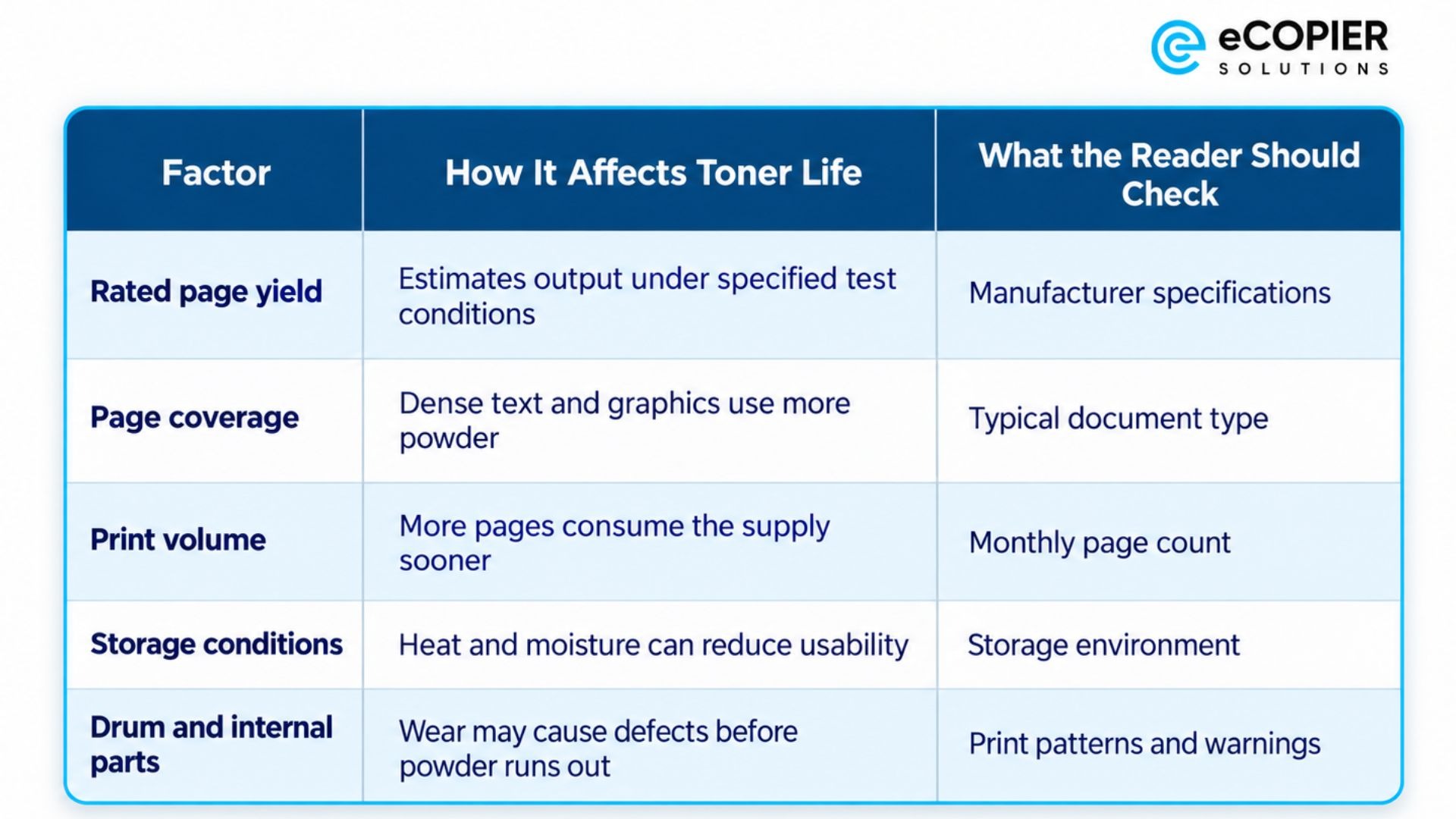
A yield estimate is a comparison tool rather than a promise for every document. Full-page graphics can exhaust a supply sooner than sparse text. Some machines also consume toner during automatic calibration.
When you compare laser printer toner cost, divide the purchase price by the rated yield. High-capacity supplies can lower that estimated cost per page, although they require a larger upfront purchase. Check that your print volume justifies the extra capacity.
How Should You Store Laser Toner?
Store laser toner in its sealed packaging, away from light, with stable temperature and humidity that meet the manufacturer’s requirements. An indoor supply cupboard usually offers more consistent conditions than a garage or basement.
For example, Canon’s US manual specifies 32°F-95°F and 35%-85% relative humidity without condensation. Those limits apply to the listed equipment, so check your own model’s guidance before you store a laser toner cartridge.
Here are the practical precautions:
- Keep unopened supplies inside their original sealed protective bags and boxes until installation.
- Choose a clean indoor location where temperature and humidity stay reasonably steady throughout the year.
- Follow the recommended storage orientation. Avoid stacking boxes in ways that could crush them.
- Keep the supply and any exposed photosensitive drum away from sunlight and bright indoor light.
- Avoid shelves beside heaters, windows, sinks, pipes, or other potential water sources.
- Let a cold supply gradually reach room temperature before installation, following the manual’s acclimation instructions.
- Mark purchase dates on the boxes and use older compatible stock first.
- Check the printer model and replacement part number before opening a package. Similar-looking products may be incompatible.
How Can You Diagnose Printer Toner Issues After Storage?
Diagnose problems after storage by checking the supply status, printing an internal test page, and comparing the defect with your model’s troubleshooting guidance. Poor output alone does not prove that the powder has expired.
Here are the patterns worth checking:
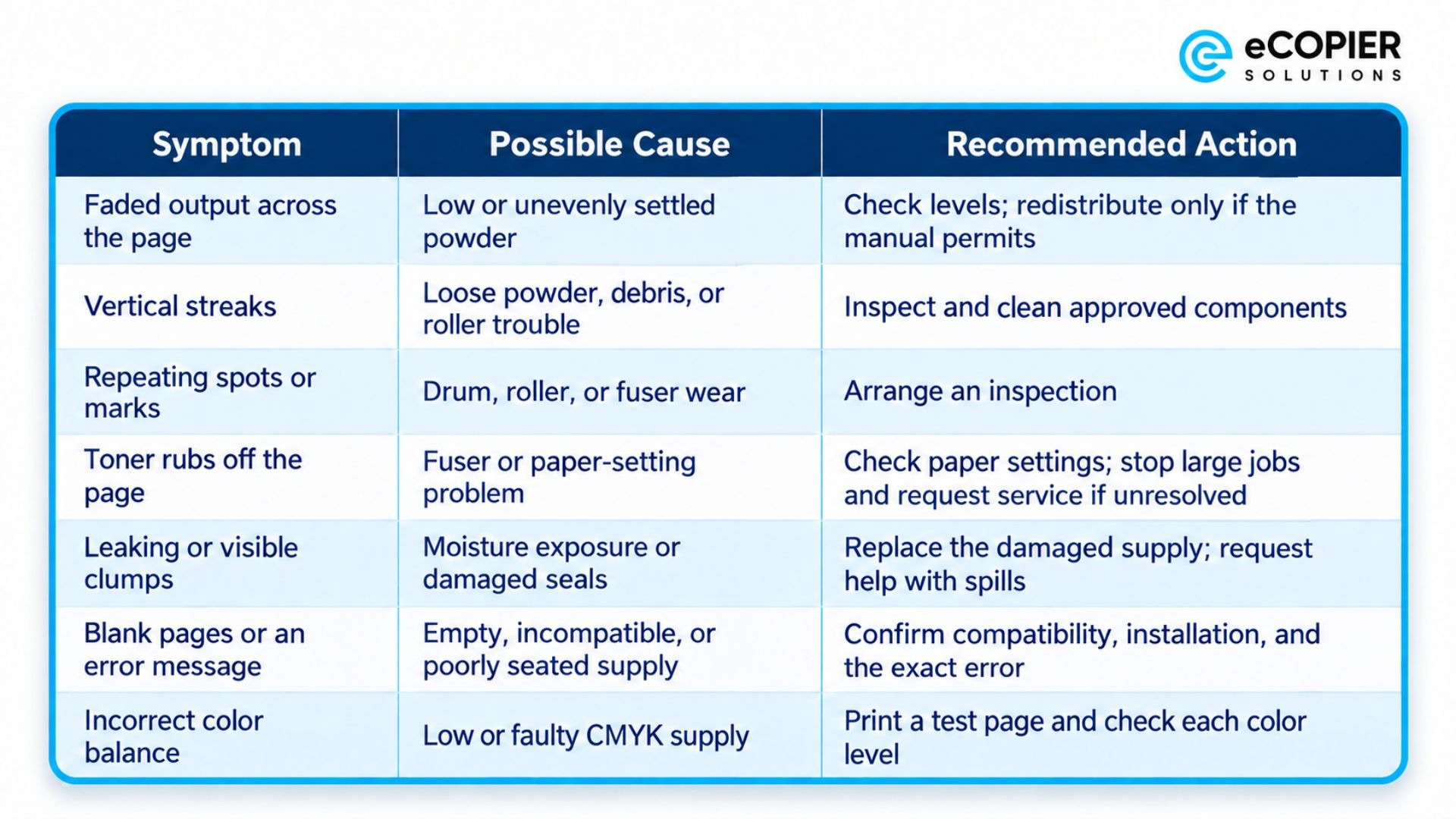
These are starting points, so use the error code and your manual to narrow down the cause. If debris or loose powder appears responsible, our guide explains how to clean a toner cartridge safely, so make sure to read that as well.
Apart from that, we think you should avoid water, compressed air, aggressive shaking, and ordinary household vacuums. If a leak, recurring error, fuser problem, or print defect remains after one approved inspection and test page, arrange professional service. Stop immediately if you find damage or a substantial spill.
Make Toner Management Easier With eCopier Solutions
Laser printer toner doesn’t dry out, but proper storage and timely maintenance still matter when you need dependable output.
At eCopier Solutions, we offer copier and printer leasing with toner included for businesses that want equipment and support through one provider. Our packages include free unlimited toner, maintenance, and shipping, with remote management, nationwide availability, and 24/7 customer service.
For a practical example, a Maserati dealership simplified its toner and printer management needs with us. Our team focused on automatic replenishment before supplies ran out and zero unplanned printer downtime after deployment. We helped take routine supply and service coordination off the dealership’s internal team.
That’s the kind of quality service and care you can get if you work with us.
Request a quote, and we’ll help you choose a setup that fits your business.
Frequently Asked Questions
What Is Dry Toner Printing?
It is a printing process that uses electrically charged powder and an imaging drum to form text and pictures. The image transfers to paper, and a fuser applies heat and pressure so the particles bond to the sheet.
How Should Toner Cartridges Be Stored for Long-Term Preservation?
Keep them sealed in their original packaging in a stable indoor environment away from bright light. Follow the manufacturer’s storage position and environmental limits. After cold storage, allow gradual acclimation before installation to reduce the risk of condensation.
How Long Does Printer Toner Last Unopened?
Properly stored unopened toner may remain usable for several years, although there is no universal lifespan across all models. Check the manufacturer’s date code, warranty terms, and storage instructions. A warranty end date alone does not establish whether the powder is unusable.
How Do You Properly Shake a Toner Cartridge?
If the manual permits redistribution, gently rock it side to side while level. First, switch off the machine, let it cool, and remove the supply as instructed. Follow the specified motion and repetitions; vigorous shaking risks leaks, and any improvement may be temporary.
Does Laser Printer Toner Go Bad?
Yes, powder and cartridge components can deteriorate after moisture exposure, excessive heat, damaged seals, or prolonged storage. Light can also harm an exposed drum. Check physical condition and print quality before discarding an older supply solely because of its age.
Do Laser Printers Run Out of Toner?
Yes, laser printers eventually exhaust their supply because text and images consume powder. Supply-level warnings, persistent fading, and rated page yield help indicate when replacement is due. Remaining-page estimates are approximate, so keep a compatible spare available for essential jobs.
Are Laser Printers Better for Infrequent Use?
Laser printers are often a practical choice for occasional document printing because their powdered supplies avoid evaporation-related clogs. Still, compare equipment price, color requirements, photo quality, and available space before choosing a model. Occasional use does not eliminate every maintenance need.
Can You Print Without Toner?
A laser printer cannot produce text or images without toner. Some color models also stop when one color supply is empty, while others permit black-only output under specific settings. Check your machine’s manual before assuming it can continue in monochrome.
.jpg)





.webp)



.png)


