Healthcare offices use copiers every day for patient records, referrals, insurance forms, prescriptions, lab results, and plenty of other sensitive documents. Yet these machines can receive less security attention than computers or servers.
So, how does HIPAA relate to copier security? Modern copiers can store, process, print, scan, fax, and transmit patient information. In this article, we’ll explain where the risks appear, which safeguards matter, and what to check when evaluating equipment.
How Does HIPAA Apply to Copiers and Multifunction Printers?
HIPAA applies to copiers and multifunction printers when a covered entity or business associate uses them to handle protected health information (PHI) or electronic protected health information (ePHI).
A modern copier may contain a hard drive, internal memory, document queues, scanning functions, fax capabilities, network connections, and email features. Because of that, patient information may exist digitally inside the device as well as physically on printed pages.
For copier security, that means devices handling ePHI should be included in the organization’s security risk analysis. HHS risk-analysis guidance calls for organizations to identify where ePHI is created, received, maintained, or transmitted, and electronic storage media falls within that review.
A copier model alone cannot make an organization HIPAA-compliant. Configuration, staff practices, access policies, vendor relationships, and lifecycle management all affect how securely the device is used.
What Are the Three Major Security Safeguards in HIPAA?
The three major HIPAA Security Rule safeguard categories are administrative, physical, and technical safeguards.
That framework matters here because a copier touches several parts of a healthcare organization at once. One machine may involve staff procedures, physical document handling, network access, and stored electronic information.
Here are the three categories to understand:
- Administrative safeguards cover risk analysis, written procedures, workforce practices, access policies, vendor management, and responsibility for protecting ePHI.
- Physical safeguards address device location, physical access, printed PHI, and the way equipment is moved, reused, or retired.
- Technical safeguards address authentication, access controls, audit capabilities, encryption, and transmission protection.
A copier that handles ePHI may need protections from all three categories, so reviewing only its built-in technology leaves part of the picture unfinished.
Where Can PHI Be Exposed Through a Copier?
PHI can be exposed through copier storage, printed output, network connections, scanning workflows, servicing, and equipment disposal.
The risk typically moves with the document. A patient record may start on a computer, pass through the copier’s memory, travel across a network, and eventually appear on paper.
Here are the main exposure points:
- Internal storage and job memory: Copies, scans, faxes, print jobs, temporary files, and address-book data may remain in device storage. Our guide to copier data protection techniques explains this area in more detail.
- Printed documents and output trays: Patient records may be viewed, removed, or misplaced when they sit unattended. In one healthcare survey, about 69% of managers had seen or picked up sensitive documents left in a printer or public area.
- Network and scanning workflows: Connected MFPs may exchange information with computers, email systems, file servers, cloud platforms, and other network resources.
- Servicing, lease returns, and disposal: Information can remain on a device after it leaves the healthcare organization’s direct control.
What Copier Safeguards Help Support HIPAA Compliance?
Copier safeguards that can support HIPAA compliance include controlled access, secure print release, data protection, network controls, physical protections, audit capabilities, and documented risk management.
Once you know where information can travel, the practical job becomes easier to define. Each control should address a specific point where PHI could be exposed.
Here are the safeguards we recommend reviewing first.
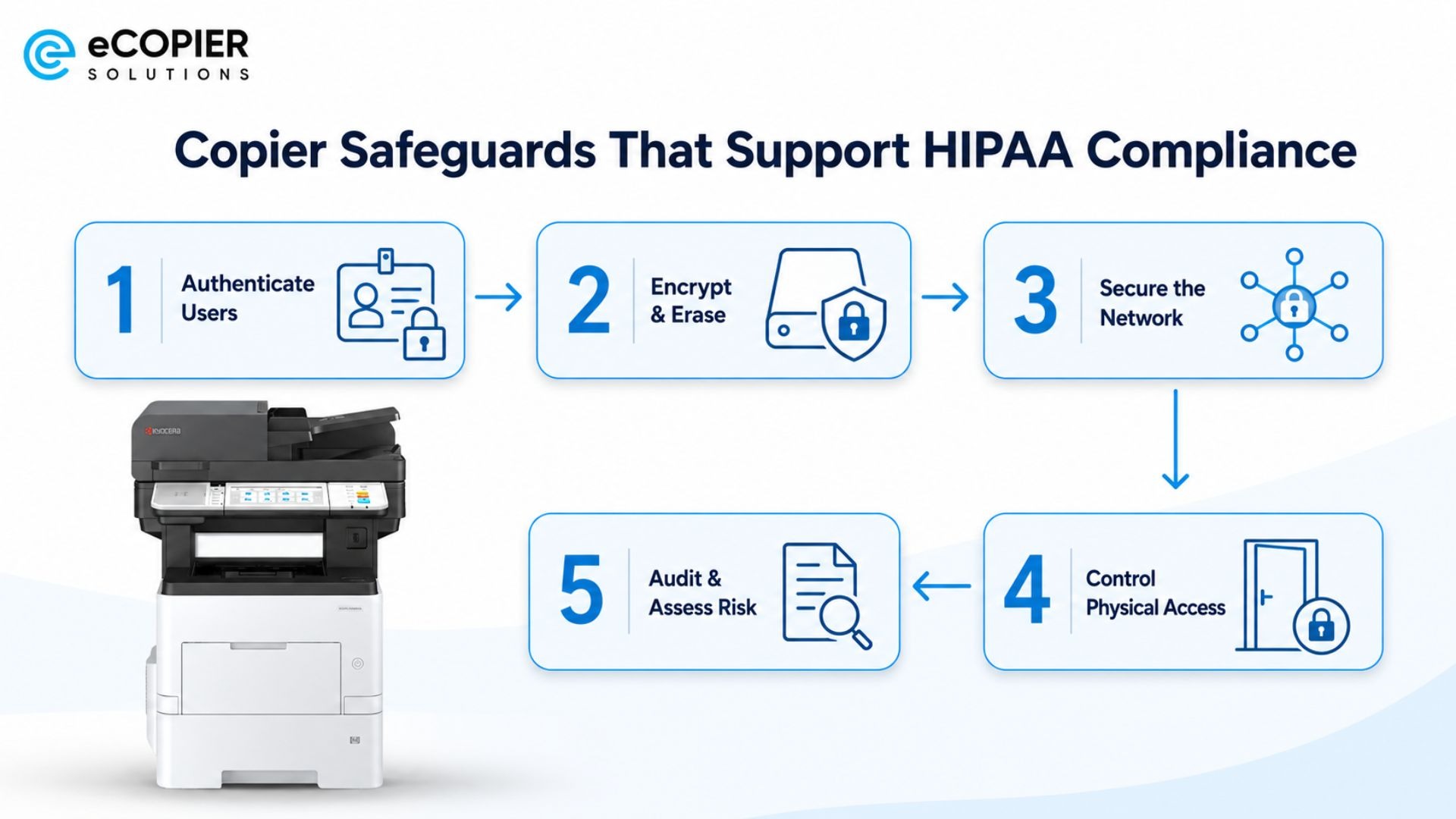
Require User Authentication and Secure Print Release
Individual PINs, passwords, ID badges, cards, or user accounts can restrict who uses the device and which functions they can access. Role-based permissions can tighten that further.
With secure print management, a job can remain in a queue until the intended user authenticates at the copier. That helps reduce patient documents sitting unattended in an output tray.
Encrypt and Secure Stored Copier Data
Encryption can protect job information stored within a copier if the device retains document data.
Automatic overwrite and other data-erasure functions can also reduce residual information after a job finishes. From there, healthcare organizations should maintain a documented sanitization process for equipment that is sold, recycled, replaced, returned after a lease, or removed from service for another reason.
Protect the Copier as a Network Endpoint
A connected copier deserves the same kind of attention given to other network endpoints. We recommend reviewing default administrator credentials, firmware updates, unnecessary ports and protocols, print and scan traffic, remote administration, and network segmentation where appropriate.
The credential issue is worth taking seriously. Rapid7 found default credentials enabled in about 89% of 136 multifunction-printer security assessments conducted from 2020 through 2025. Those assessments involved penetration-testing clients, so the figure should not be treated as representative of every healthcare organization.
Control Physical Access and Printed Output
Physical controls still matter because sensitive information eventually reaches paper.
Copiers can be placed in staff-controlled areas, and employees should retrieve sensitive documents promptly. Organizations should also have procedures for originals, misprints, paper jams, and abandoned pages. Access to trays and device panels can be limited where the workflow calls for it.
Use Audit Controls and Include Copiers in Risk Management
User activity records, device logs, monitoring, and written policies can help an organization understand how its equipment is being used.
Copiers that handle ePHI should also appear in risk analysis and lifecycle planning. Vendor access deserves review as well. If an outside service provider creates, receives, maintains, transmits, or otherwise has relevant access to PHI during its work, the healthcare organization should determine whether a Business Associate Agreement is required.
What Is a Real-Life Example of a Copier-Related HIPAA Violation?
A major real-life example is the Affinity Health Plan case, where leased photocopiers were returned with PHI still stored on their hard drives.
OCR found that Affinity had failed to include the ePHI stored on those hard drives in its risk analysis and lacked appropriate policies and procedures for returning the hard drives to its leasing agents. The incident potentially exposed the PHI of up to 344,579 individuals.
Affinity Health Plan agreed to pay $1,215,780 to settle potential HIPAA Privacy and Security Rule violations connected with the photocopiers.
The practical lesson is fairly simple. A copier can continue carrying sensitive information after staff stops using it. For that reason, lease returns, replacement, reuse, and disposal belong inside the organization’s information-security process.
How Should a Healthcare Organization Evaluate a Copier?
A healthcare organization should evaluate a copier by looking at its security controls, data handling, network capabilities, audit features, lifecycle procedures, and fit with the organization’s document workflow.
Once those needs are clear, comparing machines becomes much more useful. We recommend asking specific questions before buying or leasing equipment.
Here are the main areas to review:
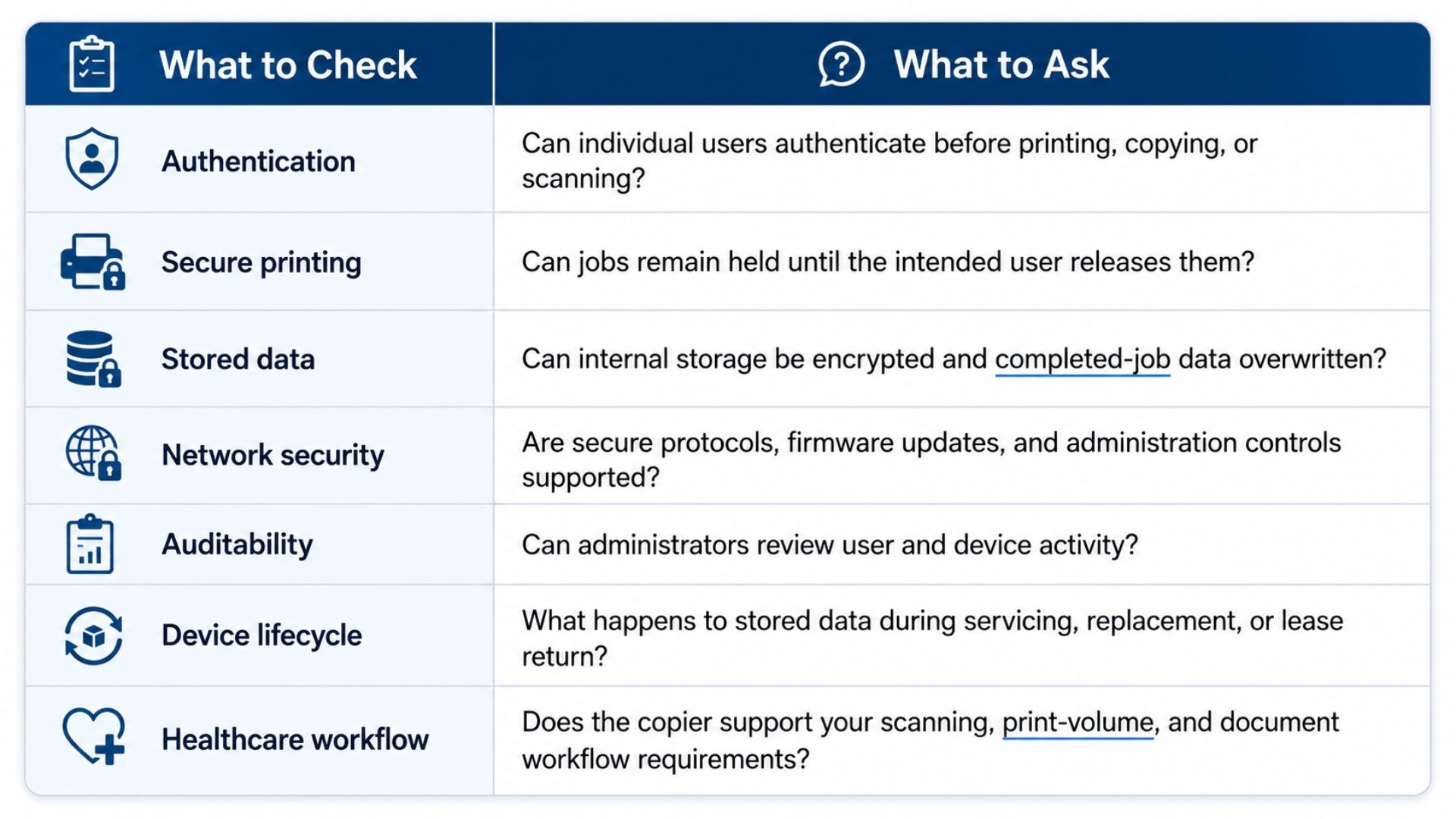
Once you know which security and workflow questions to ask, it becomes easier to compare equipment that fits a healthcare environment. For more guidance on that process, see our copier solutions for healthcare organizations. This approach gives you a clearer picture of what the device can actually support than relying on a broad HIPAA-compliant label.
How Can eCopier Solutions Help With Secure Healthcare Printing?
eCopier Solutions can help healthcare organizations compare multifunction equipment and support options around their security, scanning, print-volume, color, capacity, setup, maintenance, and management needs.
For a smaller medical office, the Kyocera ECOSYS MA5500ifx may fit a compact multifunction workflow. The Kyocera TASKalfa MA4500Ci is worth considering when color, scanning, and secure printing capabilities matter. Larger practices or departments with heavier print volumes and faster scanning needs may look toward the Kyocera TASKalfa MZ6001i.
We also provide leasing, setup, maintenance, remote management, and ongoing support. You can explore our secure copier and print management solutions and compare options based on the way your healthcare team actually works.
FAQs
Does HIPAA Require a Specific Type of Copier?
HIPAA does not require one specific copier model. Healthcare organizations should choose appropriate safeguards based on the PHI involved, the device’s capabilities, its intended use, and the risks identified within their environment.
How Often Does HIPAA Need to Be Signed?
There is no universal schedule for re-signing HIPAA itself. If you are searching how often does HIPAA need to be signed, you may be referring to a Notice of Privacy Practices acknowledgment. Healthcare providers generally ask patients to acknowledge receiving that notice, while HIPAA does not require every patient or employee to sign the law on a recurring schedule.
Does a Copier Service Company Need a Business Associate Agreement?
A copier service company may need a Business Associate Agreement when its services involve creating, receiving, maintaining, transmitting, or having relevant access to PHI. The answer depends on the actual service relationship, so healthcare organizations should review vendor access before assuming the agreement is or is not required.
What Should Happen to a Copier Hard Drive at the End of a Lease?
A copier hard drive that may contain PHI should be securely sanitized or otherwise handled under the organization’s documented device and media procedures before the machine leaves its control. The lease-return process should clearly define who is responsible for that step and how completion is documented.





.webp)


.png)